

Asset Management · RFID · Ticketing

Asset Management System with RFID Tracking in Qatar

Know what you own, where it is and who has it. One system for your asset register, RFID and barcode tagging, stocktaking, maintenance and helpdesk tickets, for organisations in Doha and across Qatar.

Assets are tagged with active or passive RFID, QR code or barcode labels, then tracked through their whole lifecycle, from purchase and assignment to repair, transfer and disposal. We survey your sites, supply the tags, readers and handhelds, set up the software and support your team locally.
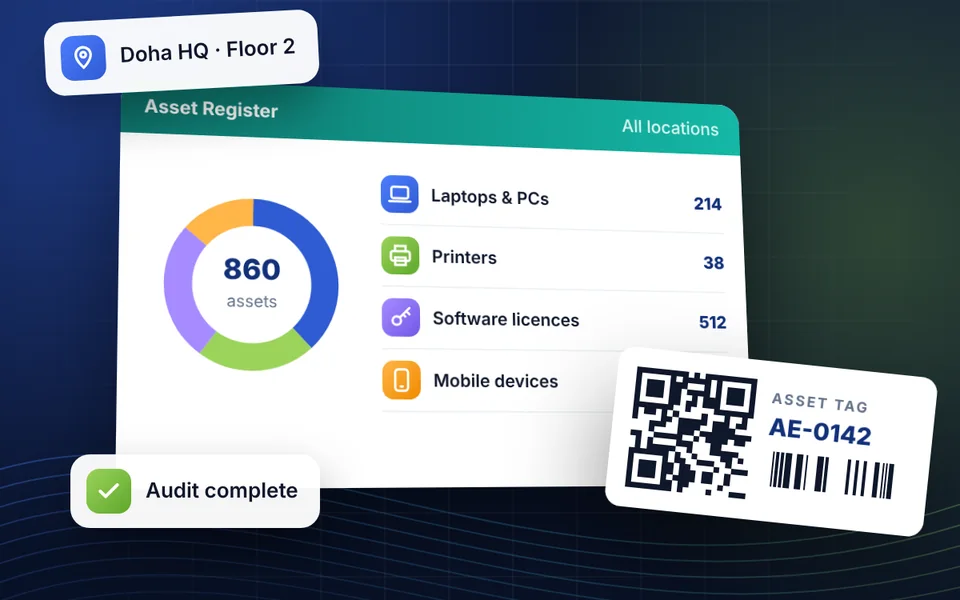
Asset register dashboard showing asset counts by category, a QR asset tag and a completed audit

Web portal + mobile app + RFID handhelds

3-in-1assets, RFID tracking & ticketing

Built for everyone who handles your assets

Each role sees only the menus and data its permissions allow.

Asset management features

20 modules covering the full asset lifecycle, RFID tracking, stocktaking, maintenance and helpdesk ticketing, in one system.
Asset register & lifecycle

Asset Register

  • Asset cards with custom fields
  • Bulk import from Excel
  • Categories, models and serial numbers
  • RFID, QR code and barcode labels

Status & Lifecycle

  • Procurement to retirement
  • In use, in stock, borrowed or in repair
  • Custom status values
  • Complete history for every asset

Assignment & Transfers

  • Assign to people, departments or locations
  • Borrowing with expected return dates
  • Overdue return reminders
  • Hand-overs confirmed by tag scan

Disposal

  • Scrap, transfer or report as lost
  • Single or batch disposal
  • Approval before disposal
  • Disposal reports by type and date

RFID asset tracking & security

Active RFID Tracking

  • Battery-powered, long-range tags
  • Zone-based asset location
  • Real-time presence detection
  • Low-battery alerts

Passive RFID & Gate Readers

  • Low-cost tags with no battery
  • Readers at entrances and exits
  • Automatic in and out records
  • Last-seen location for each asset

Movement Alerts

  • Restricted zones for key assets
  • Alarm on unauthorised exit
  • Tag removal (tamper) alerts
  • Missing and unscanned asset alerts

RFID Handhelds

  • Android handheld RFID readers
  • Read many tags in one sweep
  • Offline scanning with auto-sync
  • Bluetooth, USB and Wi-Fi

Stocktaking & maintenance

Stocktaking

  • Full, random and self-stocktaking
  • Automatic counts from RFID reads
  • Variance and missing-asset reports
  • Export and print the results

Inspections

  • Inspection routes and schedules
  • Tasks assigned to inspectors
  • On-time completion statistics
  • Faults raised during inspection

Maintenance & Repair

  • Preventive and corrective work
  • Planned, periodic maintenance
  • Overdue maintenance reminders
  • Service history linked to the tag

Warranty & Contracts

  • Warranty expiry tracking
  • Service contracts and vendors
  • Renewal reminders
  • Manuals and documents attached

Helpdesk & maintenance ticketing

Ticket Creation

  • Web portal, mobile app and email
  • Scan an asset tag to open a ticket
  • Photos, documents and notes
  • Incident, repair, loss and request types

Workflow & Approvals

  • Configurable ticket workflows
  • Multi-level approvals
  • Auto-routing to IT, maintenance or vendor
  • Open, in progress, resolved, closed

SLA & Escalation

  • SLAs by asset type and priority
  • Low, medium, high and critical
  • Alerts before an SLA is breached
  • Automatic escalation rules

Ticket Tracking

  • Status visible to the requester
  • Two-way comments in each ticket
  • Email and in-app notifications
  • Reopen if the problem returns

Security, reports & integration

Users & Roles

  • Role-based menus and permissions
  • Requester, approver and resolver roles
  • Multi-site organisation structure
  • Single sign-on with Microsoft Entra ID

Audit Trail

  • Every change logged by user and time
  • Scan logs with time and location
  • Read-only history for users
  • Evidence for internal and external audits

Reports & Dashboards

  • Asset utilisation and movement history
  • Stocktaking accuracy reports
  • SLA compliance and resolution times
  • Technician and team performance

Integration

  • Microsoft Dynamics 365 ERP via API
  • Excel import and export
  • APIs for readers and handheld apps
  • Data migration from your old system
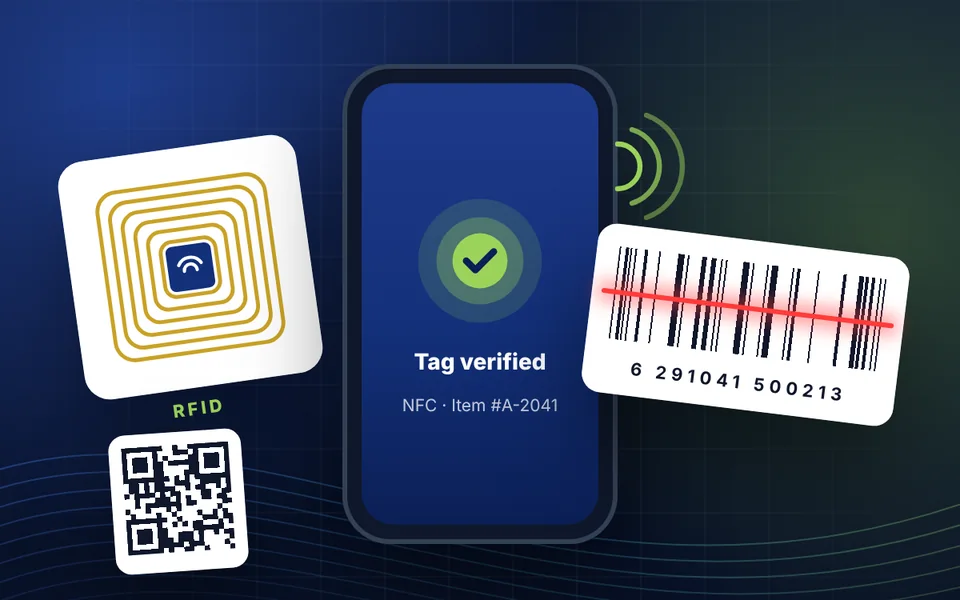
RFID tag, QR code and barcode label being verified on a handheld device

Active vs passive RFID: which tags do your assets need?

Most organisations use both. The right mix depends on what an asset is worth, how often it moves and how quickly you need to know when it does. We recommend the mix during the site survey.

Active RFID tags

  • Battery-powered, with a battery life of several years
  • Send their ID at set intervals, so assets are located by zone in real time
  • Raise alarms when a key asset leaves its zone or a tag is removed
  • Best for valuable or critical equipment

Passive RFID tags

  • No battery, low cost per tag and long-lasting
  • Read by handhelds and by readers at entrances and exits
  • Record each asset’s last-seen location and every in and out movement
  • Best for high-volume assets such as furniture, IT equipment and tools

QR code and barcode labels work alongside RFID, so lower-value items can be tracked with a phone camera. Tags follow common standards such as EPC Gen2 (UHF RFID).

Self-service portal and mobile app

Employees manage their own assets and requests from the web portal or the mobile app, which cuts the emails and phone calls to your IT and facilities teams.

  • App Store
  • Google Play

Features in the app

  • My assigned assets
  • Asset details
  • Raise a ticket
  • Report damage
  • Repair requests
  • Replacement or upgrade
  • Return an asset
  • Transfer requests
  • Request status
  • Digital acknowledgement
  • Usage policies
  • Movement history
  • Maintenance schedule
  • Warranty dates
  • Manuals & documents
  • Notifications
  • Search & filters
  • Activity history

Digital asset acknowledgement

  • Employees confirm receipt of each asset
  • Accept usage policies and terms in the app
  • Every acknowledgement kept on record

For technicians on the move

  • Scan a tag to see the asset and open a ticket
  • Work offline and sync when back on the network
  • Maintenance and SLA alerts on the handheld

How we implement your asset management system

From the first site visit to go-live, our team in Doha plans, installs and supports the full system.

  1. Step 1: Site survey

    We visit your sites, count the entrances and exits that need gate readers, and check your existing Wi-Fi and RFID infrastructure for compatibility.

  2. Step 2: Proposal and quotation

    We recommend the mix of active and passive tags, readers and handhelds, and send a detailed quotation.

  3. Step 3: Tagging and installation

    We install the readers, tag your assets, set up the software, connect your ERP and sign-on, and migrate your existing asset and ticket data.

  4. Step 4: Training and support

    We train your administrators, technicians and users, then support the system locally after go-live.

Planning an asset tagging project?

Call, WhatsApp or email our team in Doha to book a demo or a site survey.

Gate readers for assets are often installed at the same entrances as staff access control, turnstiles and barriers, and every reader needs reliable network cabling. We supply and install all of these, so one team handles the whole project.

Need to track vehicles or mobile equipment outside your buildings? GPS tracking covers assets on the road.

Asset management system: frequently asked questions

What is an asset management system?

It is software that keeps a single register of everything your organisation owns, such as IT equipment, furniture, tools, vehicles and software licences, and tracks each asset through its lifecycle: who has it, where it is, its condition, maintenance, warranty and eventual disposal.

How does RFID asset tracking work?

Each asset carries an RFID tag with a unique ID linked to its record. Fixed readers at entrances, exits and zones pick up tags automatically, and handheld readers scan many tags at once during stocktaking. The system records every read, updates the asset’s location and raises an alert when an asset moves without permission.

Can we use barcodes and QR codes as well as RFID?

Yes. QR code and barcode labels work alongside RFID tags in the same system. Many organisations use RFID for valuable or frequently moved assets and printed labels for lower-value items.

How long does a stocktake take with RFID handhelds?

Much less time than with paper lists or one-by-one barcode scanning, because a handheld reads many tags in one sweep without needing line of sight. The system compares what was found with the register and produces a variance report, listing missing and unexpected assets.

Does it integrate with Microsoft Dynamics 365 and single sign-on?

Yes. Asset data is shared with Microsoft Dynamics 365 through APIs, so finance keeps handling depreciation in the ERP while the asset system manages the physical assets. Users can sign in with their Microsoft Entra ID (Azure AD) accounts.

Can the system run on our own servers?

Yes. It can be deployed on-premise in your own data centre, and it supports multiple sites and organisation levels from one installation.

How many gate readers will we need?

It depends on the number of entrances, exits and zones you want to control at each site. We carry out a site survey to count the passageways and include the exact readers in our quotation.

Supply · Installation · Support

Put the right system to work.

Start with attendance, access control or IT infrastructure. Our Doha team will help you choose the right setup and plan the installation.

Talk to our team